Deploying Views
Learn how to deploy Views with the Watch Portal.
In this section, we'll explore how to deploy a View (as well as proceed to query the View afterward) by using an Aggregated Data Feed use case as an example. You can also explore other use cases that demonstrate Analog Watch's true potential here .
Problem Overview
Decentralized Finance (DeFi) enables billions of dollars worth of trades across various blockchains. Because many DeFi activities take place on Decentralized Exchanges (DEXs), a colossal volume of data regarding liquidity, token swaps, staking, and more is stored on-chain.
As such, DEXs can provide valuable financial market data through on-chain price feeds, such as exchange rates for cryptocurrencies, commodities, indices, stablecoins, and other essential financial datasets. However, accurate price discovery for a particular asset within the entire crypto space remains an issue because each DEX is typically hosted on a different blockchain, each having a different set of network validators to match orders and perform cross-chain swaps.
Such an issue leads to discrepancies in asset prices across different DEXs, making it difficult for users to trade effectively and make sound investment decisions in the crypto market.
What We’re Building
The application we’re building is a simple price feed aggregator. It collects and processes data from two smart contracts: Uniswap for the WETH/USDC pair and Curve.Fi for the USDT/WBTC/WETH pool. Here are the addresses for these smart contracts:
- Uniswap:
0x88e6A0c2dDD26FEEb64F039a2c41296FcB3f5640 - Curve.Fi:
0xD51a44d3FaE010294C616388b506AcdA1bfAAE46
For more details on how you can list these smart contracts, check out Listing Smart Contracts.
The price feed aggregator should be able to average these price data and present a mean value of the prices served by Uniswap and Curve (against USDC and USDT).
Next Steps
We'll deploy this View in three ways: Watch Portal, Watch SDK, and GraphQL IDE. Depending on your selection, here’s how to proceed:
Watch Portal
Follow these steps to get started with deploying your Views:
Step 1: Check to ensure the relevant Smart Contract(s) and functions are published
First, ensure the smart contract(s) you intend to use are listed. Check out Listing Smart Contracts to learn more.
In this example, we'll ensure that the two smart contracts we want to use are listed (i.e., 0x88e6A0c2dDD26FEEb64F039a2c41296FcB3f5640 for Uniswap (WETH/USDC) and 0xD51a44d3FaE010294C616388b506AcdA1bfAAE46 for CurveFi(USDT/WBTC/WETH).
Additionally, you'll need to ensure that the relevant functions are also listed. For example, slot0(), which stores many values we're interested in the Uniswap smart contract, and get_dy(), get_virtual_price () for the CurveFi.
Step 2: Create a View Definition
After checking that the relevant smart contract(s) are listed, you’ll need to create a View Definition (i.e., a list of smart contracts and their relevant function(s) from which to collect and index the View data). Follow these steps to create a View Definition:
- Launch the Watch Portal( https://watch.testnet.analog.one/ ) and connect your wallet.
- Now, locate the "View Builder" link at the top center of the screen and click on it. This should open a UI with three panels, as shown below:
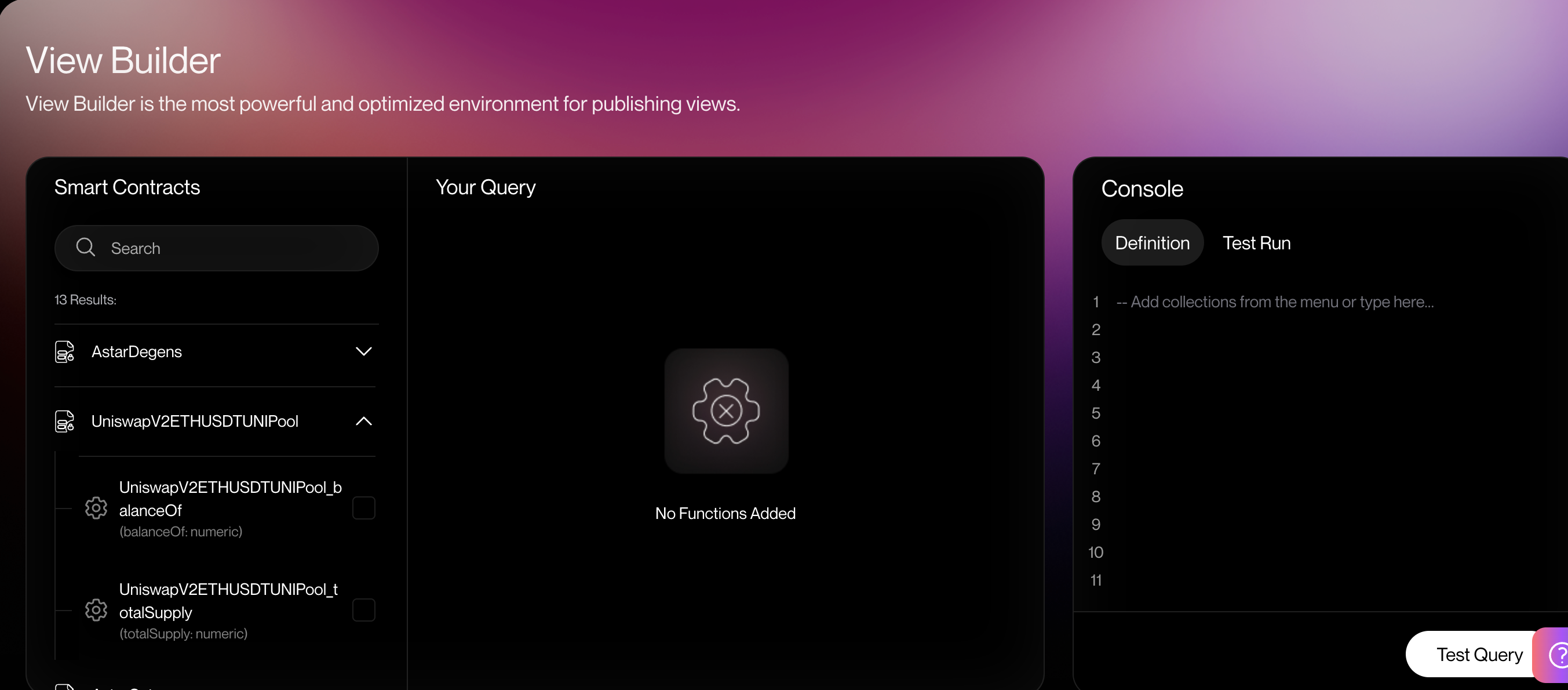
The left panel ("Smart Contracts") displays a list of deployed Smart Contracts. The middle panel (“Your Query”) shows the list of the functions and parameters you want the View to index from the selected smart contract. The right panel ("Console") has two tabs: Definition, which autogenerates the SQL statements required to fetch and present the contract data, and Test Run, which you can use to test drive the View.
- From the left panel (i.e., “Smart Contracts”), select the smart contract(s) you want to index and their relevant functions.
In this case, we'll select two contracts:
WETH/USDC: This collection retrieves and indexes data from theUniswapsmart contract on Ethereum. This contract has one basic function:slot0(), which stores a list of numbers we're interested in.USDT/WBTC/WETH. This collection retrieves and indexes data from theCurve.Fismart contract. We'll select two functions from this contract (i.e.,get_dy(),get_virtual_price ()).
Step 3: Test and deploy the query
Follow these steps to deploy your View:
- Verify that the autogenerated SQL statements in the Definition tab of the Console match the particular requirements for your use case, then click the “Test Query” button.
- Now, click on the “Test Query” to proceed. If the query runs successfully, it should take you to the “Test Run” tab. However, if it fails, you must fix the errors in the “Your Query” section. You could even write your own SQL and execute it directly in the Console by clicking the “Test Run” tab.
- If satisfied with the query results, click “Deploy View” to proceed. Otherwise, modify the query in the "Your Query" section.
- In the next screen, enter the View's name (you can use the identifier), type tags, and a description. Then, click the 'Next' Button.
- Now, select the use cases where your View will be utilized. For use cases that are not listed, click the “Add new use cases” link and type in the name of the use case. Next, click the "Save" button to add the use case to the Analog Watch.
- Click the "Complete" button to deploy your View.
Congratulations! You’ve successfully published your View on the Portal!
With just a few simple lines of code, you managed to deploy a View. Now, it’s time to explore the full potential of the Analog Watch! Here are some quick links to get you started:
- Head over to the Funding Views page to learn more on how to fund your View. Then, users can start querying it, and you'll earn rewards in the form of query fees.
- Visit the Querying Data page to learn more about how to query the View data if the View is funded.