Send a Message from Chain A to Chain B
This guide provides you with an overview of the Counter smart contract, its functionality, and how it can be used as a building block for cross-chain dApps. The contract leverages a gateway mechanism to facilitate cross-chain communication.
Overview
The Counter contract is a simple example of a cross-chain-enabled smart contract. It listens for messages sent via a gateway and increments a counter (number) whenever a valid message is received. This functionality can be extended to build more complex cross-chain dApps. You can find this contract here .
Code Overview
// SPDX-License-Identifier: MIT
pragma solidity ^0.8.0;

import {IGmpReceiver} from "@analog-gmp/interfaces/IGmpReceiver.sol";

contract Counter is IGmpReceiver {
    address private immutable _gateway;
    uint256 public number;

    constructor(address gateway) {
        _gateway = gateway;
    }

    function onGmpReceived(bytes32, uint128, bytes32, bytes calldata) external payable returns (bytes32) {
        require(msg.sender == _gateway, "unauthorized");
        number++;
        return bytes32(number);
    }
}
Features
- Cross-chain message processing: The contract implements the
IGmpReceiverinterface, which defines theonGmpReceivedfunction for handling incoming cross-chain messages. - State management: Maintains a counter (
number) that increments upon receiving valid messages. - Gateway authentication: Ensures only authorized messages from the specified gateway are processed.
Contract Structure
1. Imports
The contract imports the IGmpReceiver interface:
import {IGmpReceiver} from "@analog-gmp/interfaces/IGmpReceiver.sol";This interface defines the structure for handling cross-chain messages.
2. State Variables
_gateway: Stores the address of the gateway responsible for relaying cross-chain messages.number: A public variable that tracks the current count.
3. Constructor
The constructor initializes the _gateway variable with the address of the gateway:
constructor(address gateway) {
    _gateway = gateway;
}
4. onGmpReceived Function
This function is triggered when a cross-chain message is received. It performs the following actions:
- Verifies that the sender is the authorized gateway.
- Increments the
numberstate variable. - Returns the updated counter value as a
bytes32.
function onGmpReceived(bytes32, uint128, bytes32, bytes calldata) external payable returns (bytes32) {
    require(msg.sender == _gateway, "unauthorized");
    number++;
    return bytes32(number);
}
Cross-Chain Communication Flow
1. Initiate Transaction
- Send a message from the source chain through the Gateway:
// Example sender contract
function sendCrossChainMessage(address targetContract) external payable {
    gateway.sendMessage{value: msg.value}(
        targetContract,
        DESTINATION_CHAIN_ID,
        ""
    );
}
2. Message Processing
- Gateway validates and routes the message
- Destination gateway calls
onGmpReceived
3. State Update
counterincrements on successful message receipt- Return value sent back as execution receipt
Example Use Case: Cross-Chain Counter Increment
Imagine you want to track an event occurring across multiple chains (e.g., user actions). You can use this contract as follows:
- Deploy it on each chain with the same gateway address.
- Configure your gateway to relay events from one chain to another.
- Use the incremented counter (
number) as a measure of cross-chain activity.
Prerequisites
To get started with Analog GMP, you need to have the following components ready:
- IDE, such as Remix IDE
- EVM wallet, such as Talisman , MetaMask , etc.
- Acquire enough faucet tokens. Here are some links to access the faucets:
Sepolia
Deploy the Counter.sol Contract on the Destination Chain
Deploy the Counter.sol contract on the Sepolia network:
- Open the Counter.sol in Remix.
- Compile the contract.
- Now, deploy the contract as follows:
- Open your MetaMask wallet and switch to the “Sepolia” network.
- While still in Remix IDE, locate the “Deploy & Run Transactions" tab and select “Injected Provider – MetaMask” in the Environment list.
- Fill in the amount of ETH token you’d like to pay as gas fees in the “Gas Limit” text and the gateway address in the “
At Address”text. You can find a list of gateway addresses here. - Now click on the “Deploy” button to deploy your contract. MetaMask will prompt you to confirm the transaction. Check to ensure that you’re deploying the contract on the Sepolia testnet and confirm the transaction.
Please take note of the address of the contract you just deployed. You will need it when submitting a cross-chain request on the source chain. You can find this address under the "Deployed /Unpinned Contracts" list or on the Sepolia Explorer .
Setup the IGateway Interface on the Source Chain
To initiate a cross-chain call on the destination chain, interact directly with the IGateway interface on the Shibuya network (the source chain). No contract deployment on Shibuya is required for this process:
- While still in Remix IDE, open your MetaMask wallet and switch from
SepoliatoShibuyanetwork. - Locate the “Contracts” tab in Remix IDE and select “
IGateway” contract. - Navigate to the “At Address” text and enter the gateway address for
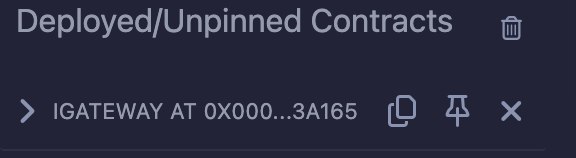
Shibuya. You can find gateway addresses here. You should now be able to see theIGatewaycontract displayed under the “Deployed /Unpinned Contracts” tab when you click on the “At Address” text.
Fund the Destination Gateway
Cross-chain calls require the sender to fund the destination gateway with sufficient gas for execution:
- Under the “Deployed /Unpinned Contracts” tab, locate the
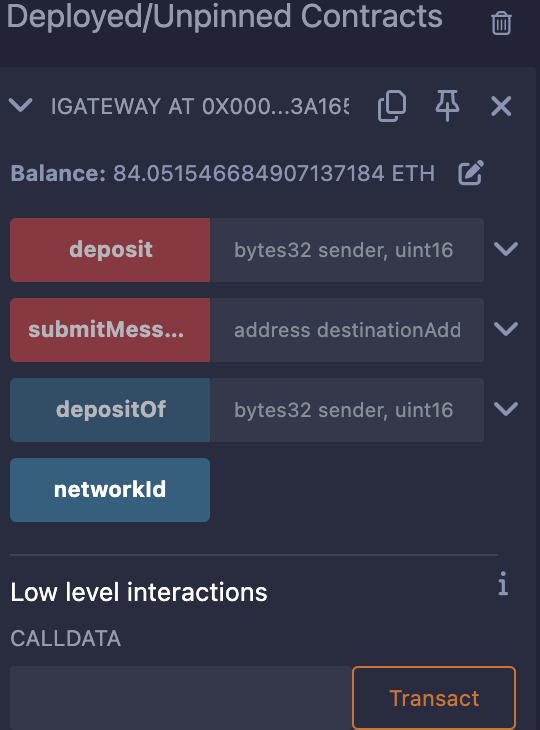
IGatewaycontract and expand on it. You should be able to see four functions as shown here:
- Navigate to the
depositfunction and fill in the details about thesenderand thesourceNetwork. See Address Conversion Details to learn more about address conversions. Also, refer to Gateway Addresses & Network IDs for more details aboutsourceNetwork. In this case, the sender can be your account or a smart contract address, and thesourceNetworkis7forShibuya. - Next, enter the amount of
ETHtokens you’d like to pay as gas fees in the “value” text, and click the “Transact” button. This value should be enough to cover the gas cost of the message you will send from the source chain. - Click transact and sign the transaction on your Wallet. You can now verify the amount of funds available on the destination gateway by specifying the sender address and destination network ID in the
depositOffunction.
When funding the destination's chain Gateway, you can use an Externally Owned Account (EOA) or a contract address. For Ethereum addresses that are 20 bytes long, you must convert them into a 32-byte address. This conversion is necessary because Analog GMP is designed to enable dApps to interact with any asset or application on any connected chain, extending beyond just EVM compatibility.
You can learn more about the conversion details in the subsequent section:
Address Conversion Details
To convert an EOA hex address into bytes32, simply pad the address with zeros(0s) from the left as follows:
0x000....000
Note that the last padded digit is 0. For example, "0x818F34269759Bf180709e7eBbaeF94b2651058b3" will convert to “0x000000000000000000000000818F34269759Bf180709e7eBbaeF94b2651058b3."
To convert a contract hex address into 32bytes, pad the address with zeros (0s) and ensure that the last padded digit is one (1) as follows:
0x000...01.
For example, "0x818F34269759Bf180709e7eBbaeF94b2651058b3" will convert to “0x000000000000000000000001818F34269759Bf180709e7eBbaeF94b2651058b3." Notice that the last padded digit is one (1).
Alternatively, you could also use this contract to convert a 20-byte address into bytes32.
// SPDX-License-Identifier: GPL-3.0
pragma solidity >=0.7.0 <0.9.0;

contract ConvertAddress {
    function toGmpAddress(address addr, bool isContract) public pure returns (bytes32 source) {
        uint256 contractFlag = isContract ? 1 << 160 : 0;
        source = bytes32(contractFlag) | bytes32(uint256(uint160(addr)));
    }

    function toGmpAddress(address addr) external view returns (bytes32 source) {
        bool isContract = addr.code.length > 0;
        source = toGmpAddress(addr, isContract);
    }
}
Dispatch a Cross-Chain Message to the Destination Chain
Dispatch a cross-chain message from Shibuya to the contract you deployed on Ethereum Sepolia:
- Open MetaMask and select the
Shibuyatestnet. - Under the “Deployed/Unpinned Contracts” tab, locate the
IGatewaycontract and expand on it. Expand thesubmitMessagefunction and fill in the following arguments:
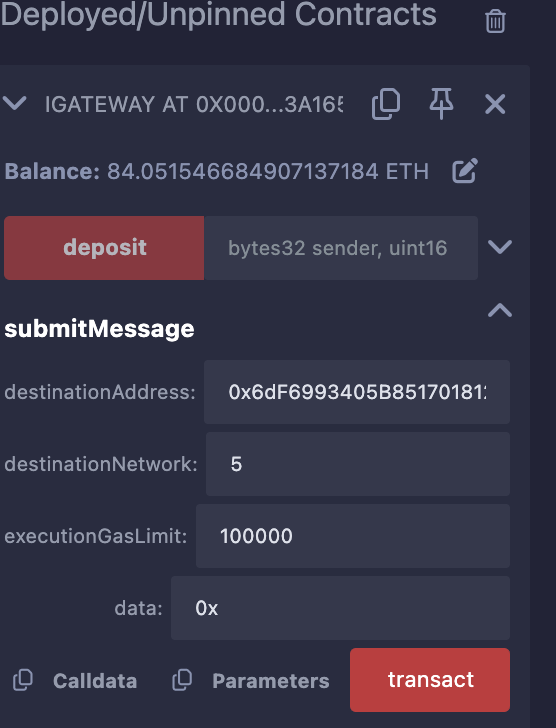
destinationAddress: The destination contract address. Enter the deployed contract address on the Sepolia network here.destinationNetwork: Analog GMP’s identifier for the destination chain. You can find these details here. For example, in the case of the Sepolia network, thedestinationNetworkshould be 5.executionGasLimit: Gas limit available for the contract call, e.g.,100000.data: Anystring, e.g.,0x.
- Next, click the “transact” button to run the method and confirm the transaction in your MetaMask.
Note that the transaction might fail if the gas prices spike significantly. If this happens, fund your destination gateway with more gas and try the transaction again. If the transaction goes through, you can note its log details, as shown here on Shibuya Explorer.